The public beta version 2 testing phase is over, and ToneX Player is now available as version 2.1.
TONEX Player Version 2.1 (officially released on October 1, 2026, following a public beta that began in August) is a free update for all existing TONEX users.
guitar-sims.com has already reported on the public beta version of TONEX 2.0 and there's also a post on Reddit about the official version 2.1.
The first thing you notice about TONEX 2.1 is the new graphical user interface. And then you see TONEX Player and TONEX Rig. Player? Rig? What’s the difference?
TONEX Player vs. TONEX Rig
TONEX Player
Compared to TONEX version 1.x, the TONEX 2.1 Player has received additional enhancements, but is essentially TONEX version 1.x with the aforementioned new graphical user interface—and it’s free.
TONEX Rig
TONEX 2.1 Rig, on the other hand, is included free with the purchase of a TONEX board or can be purchased separately without a board. The software and the board are, of course, fully compatible with each other. Presets and sounds you’ve created can be easily exchanged between the board and the software on your PC.
Additionally, you can create your own complex signal chain—something you can’t do with the TONEX Player. This is one of the most interesting enhancements in the new TONEX update.
The New Graphical User Interface
The most notable change here is that the TONEX main window now has significantly fewer functions. These are now integrated into the respective browser windows.
This means there are now two separate windows:
- the main window with the amp, cab, and effects (compressor, gate, delay, chorus, room) and
- the browser window.
The browser windows include: the Amps Browser, the Stomps Browser, the Cabs Browser, and the Presets Browser. You can only have one of them open at a time. When you switch, the first one automatically closes and the new browser is displayed.
You can also select amps, cabs, and presets in the main window, but that’s not really very intuitive. This is more for when you know where to look and don’t want to open the browser window separately. Generally, though, you’ll be working with the browser windows.
If you’re familiar with TONEX version 1.x, you’ll need to get used to the new user interface at first, since the individual functions are now located in completely different places. However, this happens pretty quickly, because TONEX is quite self-explanatory.
What I don’t like so much:
Not everything has to be black. Especially when a black confirmation window is in front of a black selection window. Not everyone sits in a completely dark room.
Furthermore, like so many guitar amp simulators, TONEX has a graphical interface that takes up a lot of space without serving any real purpose, which means you can’t really make the window smal. Especially when you’re working with plugins like this in a DAW and have multiple plugin windows open, you’re constantly moving them around to make room—at least that’s how it is for me. I don’t know how much time I’ve already wasted on this. As usual, TONEX’s amps and effects look great and are, of course, modeled after analog amps with their large cabinets and small controls, but in the world of plugins, I don’t think that’s really necessary—and it leads to the problem I described.
The Workflow
Working with TONEX 2.1 is definitely different from working with TONEX 1.x. No question about it. It’s hard to say which is better, though, because everyone will see it differently.
Do I really need two windows, which also take up valuable screen space? I got along just fine with TONEX 1.x, but I also think TONEX 2.1 is very easy to work with. Everything has its pros and cons. If I had to choose, I’d go with version 2.1 when it comes to the graphical user interface.
There is, however, room for improvement. Not much, but I feel like something is missing.
The whole management system for amps, cabs, and presets—with the favorites list and so on—is very well done. You can organize your captures and presets really well, and there’s also the ToneNET integration.
So far, so good.
But.
Unfortunately, you can’t filter the amps by character (Clean, Drive, Hi-Gain, Fuzzy, Other), even though this information is included in the metadata. If I’m looking for a Hi-Gain amp, I have to try out all the other amps as well, unless it’s obvious from the amp’s name or can be identified some other way. That’s inconvenient. With presets, this is possible. In the Amps Browser, I can only filter by Stomp + Amp, Amp, Amp + Cab, and Complex Rig. It’s absolutely essential that filtering by character be added as well. In the Presets Browser, however, there’s no option to filter by genre (e.g., Rock, Metal, Punk). This should be included in one of the next updates.
Compared to Version 1.x, it introduces the following major new features:
Major Update: TONEX Rig (optional, €99.99 / €149.99 for CS users)
The biggest new feature is TONEX Rig, which brings the complete TONEX Board rig-building experience to the software (Mac/PC):
- Flexible 12-block signal chain with dual paths, split/mix routing, and stereo operation
- Up to four tone models per preset (e.g., two amps + two stomps)
- 70+ studio effects to start with, more to follow for free
- Complete rigs can be shared, discovered, and downloaded via ToneNET
- Rigs can be transferred directly to the TONEX Board
TONEX 2.0/2.1 Player (free for everyone)
- Completely redesigned UI—significantly cleaner and more modern than v1
- 220 new Premium V2 Tone Models, created with the revamped AI Machine Modeling (improved accuracy, dynamics, and playing feel)
- Enhanced ToneNET integration with Smart Search—search, preview, and load tone models, presets, and collections directly within the app
- Workflow improvements: Resizable floating windows, multi-monitor support, custom folders, favorites, and recently used
- Performance: Reduced CPU load for complex models, improved audio bypass during scene changes
- Advanced scene control: Input, Output, Split, and Mix can now be assigned to scenes
- Global Preset Spillover Bypass—a new setting for behavior between compatible presets
- Faster workflow: Double-tap bypass for Gear, “Sync On” as the default for time-based effects
TONEX Board Firmware 1.1.0 (released simultaneously)
- USB Audio and USB MIDI as new interfaces
- Extensive performance and quality-of-life improvements
In summary
Version 1 was essentially an amp/pedal modeling app with a simple signal chain. Version 2.1 transforms TONEX into a central software platform where you can build complete multi-amp rigs with routing and effects, share them via the community, and transfer them directly to the hardware—plus a significantly redesigned interface and an expanded model library.
Links
- ToneX on ikmultimedia.com
- all News articles form IK Multimedia on guitar-sims.com
- all Software form IK Multimedia on guitar-sims.com
Videos
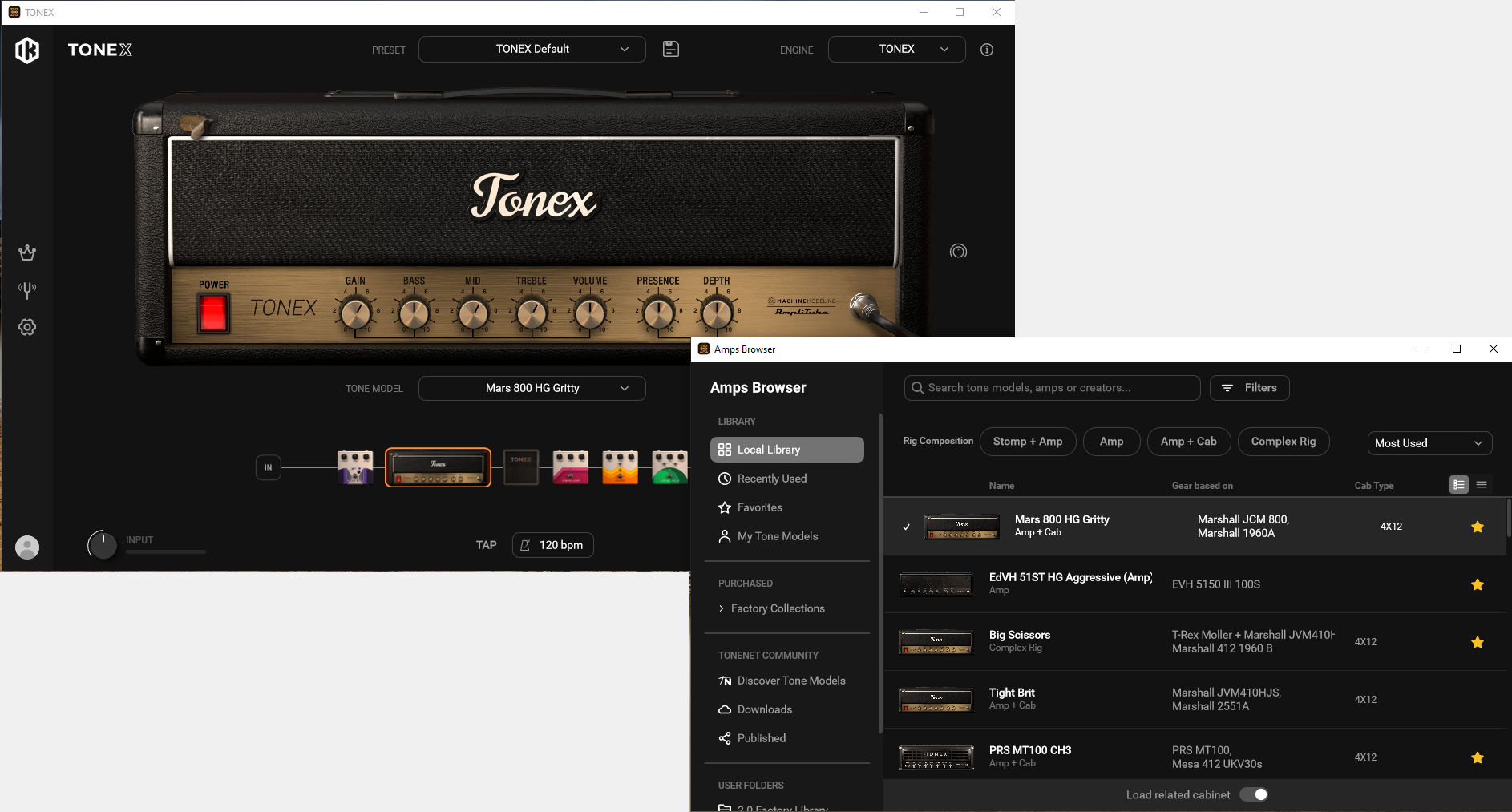
Main Window and Browser Window (click to enlarge)